What Do You Need Help With?
SYSTEMS ADVISORY: Ellucian Banner Maintenance
Ellucian Banner and all connected self-service portals will be offline for a mandatory upgrade from Midnight to 5 AM EST on Thursday, September 17th.
Experience Dashboard/ New River Portal, including registration, grading, financial aid access, and account balances, will be unavailable during this time.
Non-Banner-hosted systems will not be impacted, including Rivermail, Canvas, the River Life app, and Wi-Fi networks.
Students: Rivermail, Canvas, and Microsoft 365 applications can be accessed at go.irsc.edu. If you need assistance, contact the Student Helpdesk.
Staff/Faculty: Non-banner applications can be accessed via Okta, https://irsc.okta.com/. Please plan your registration activities and grade entries accordingly. If you have issues connecting to Banner after 5 AM, please contact the Service Desk.
Our teams are helping a high volume of students get ready for fall. Thank you for your patience.
Before visiting campus, check the options below. You may be able to complete your next step online and save time.
Even if you receive Financial Aid or The Promise Program, you may still owe fees or other charges.
Important: A delay in receiving some official high school transcripts is temporarily affecting the application of Financial Aid and Promise funding for some students. If you’ve completed your application, requested your transcript, and finished your enrollment steps, no further action is needed at this time. You can still register for classes. Students impacted by this issue will not be dropped for nonpayment or charged a late registration fee. Visit irsc.edu/support for updates and resources.
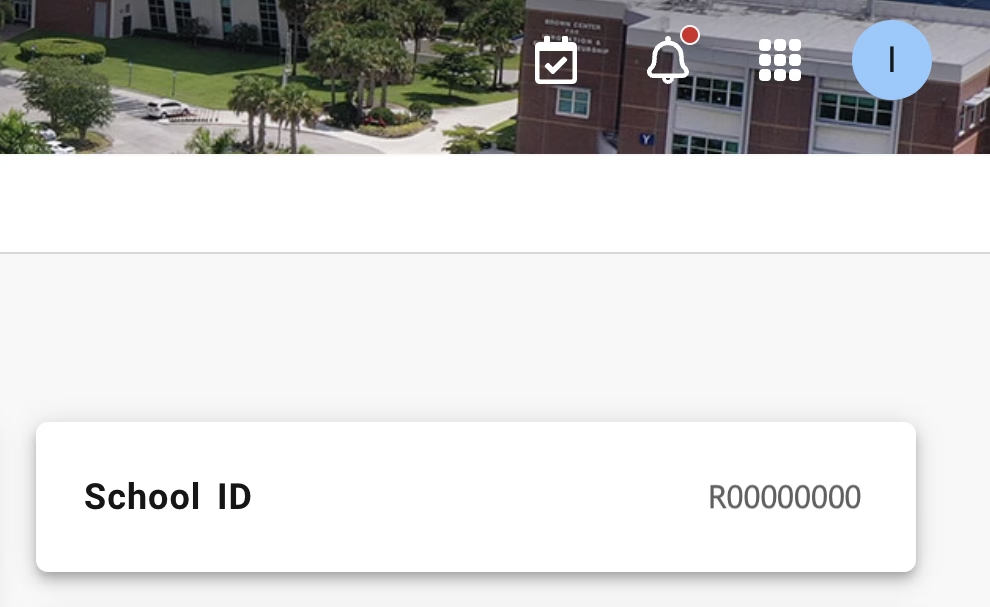
- Go to The River Portal (go.irsc.edu), select NEW River Portal
- In the top right, click the circle with your initial for your account
- Select View Profile
- Your new ID number will be under School ID section, formatted R00000000